You do not have a credit file.
You have three, and they disagree.
Some of what's wrong is in your favour. BureauGap says which — and tells you to leave it alone. See one in the demo →
BureauGap opens all three on your own computer and sets them side by side. It shows where they disagree with each other, and where one report disagrees with itself. Nothing is uploaded, because there is nowhere to upload it to.
§ 01 — The problem
The three totals look close.
That is what makes them hard to catch.
Add up what each bureau says you owe, and the three totals land within a few percent of each other. Nothing looks wrong. Now plot how far each one is from the average of the three, and the gap is the whole picture.
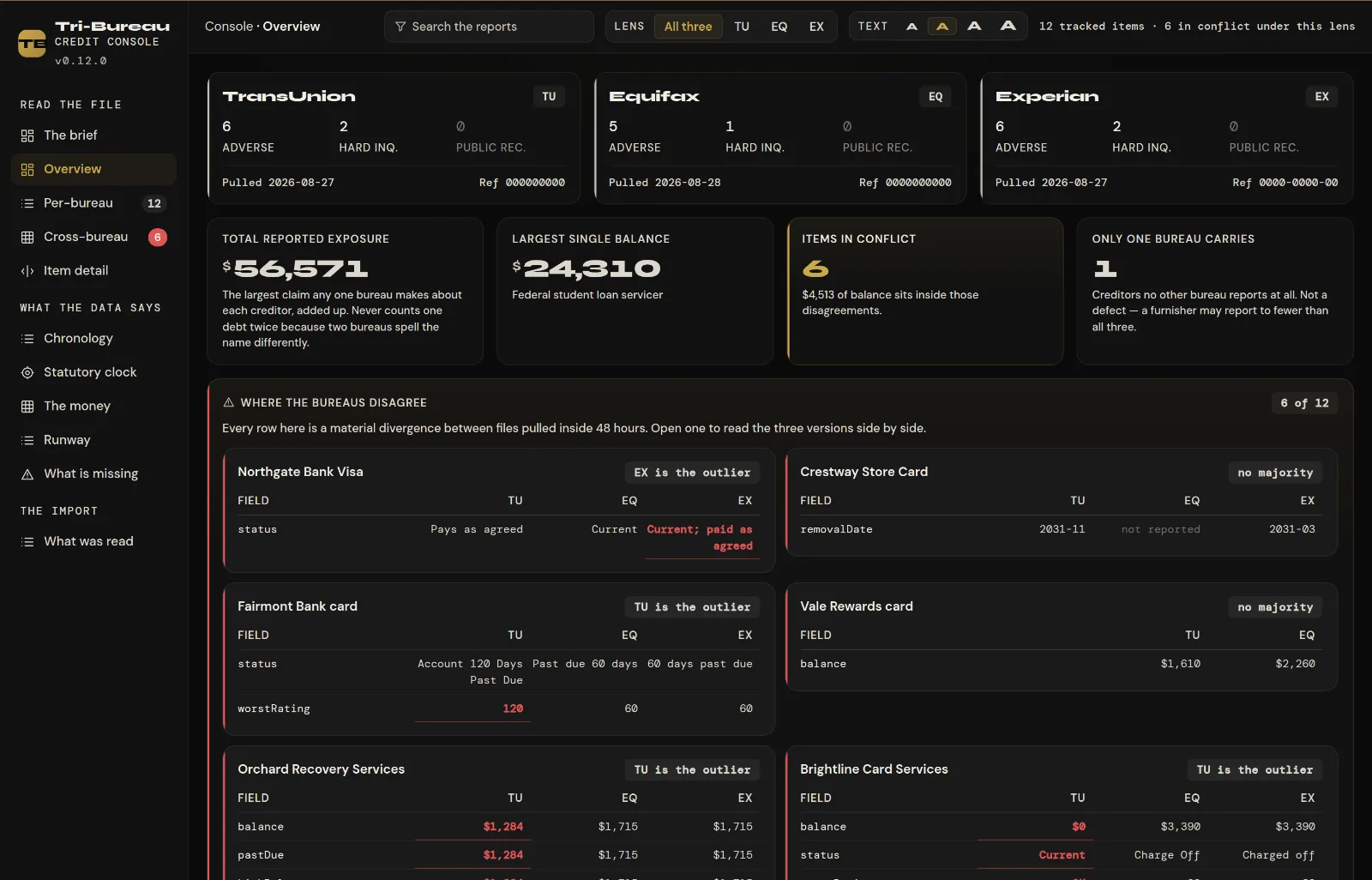
One account. Three answers. A lender who pulls the first report sees a customer in good standing. A lender who pulls either of the other two sees a charge-off. Both are reading a credit file with your name on it. This account is in the demo, with a made-up creditor and real engine output. You can open it in a browser now.
average of the three · $55,766
Measured, not drawn. Every figure here comes from the program's own two engines, run on the published demo data. That is fifteen made-up accounts, and real output. The widest pair is $2,601 apart. Drawn as plain totals, the three are a 5% spread and look like they agree. The gap is the finding, so the gap is what is drawn.
§ 02 — Why it happens
Each bureau prints a different half
of the same document.
This is how it works, and almost nobody is told. The three bureaus are separate companies. Each gets its own data from your creditors, and they do not print the same fields. The seven-year clock in FCRA § 1681c(c) runs from the date of first delinquency to a removal date. No one report states both.
| Field | TransUnion | Equifax | Experian |
|---|---|---|---|
| Date of first delinquency | 0 / 14 |
7 / 13 |
0 / 14 |
| Removal date | 7 / 14 |
0 / 13 |
8 / 14 |
| Closing date | 3 / 14 |
0 / 13 |
0 / 14 |
| Amount charged off | 0 / 14 |
4 / 13 |
5 / 14 |
| Credit limit | 7 / 14 |
7 / 13 |
6 / 14 |
Read the first two rows together. Equifax states the date the clock starts and never the date it ends. TransUnion and Experian state the date it ends and never the date it starts. With one report, the math has a hole in it. With all three, it adds up. That is not a feature of this program. It is how the reports are laid out, and it is why a single report cannot be checked against itself.
And the honest half of it: a bureau that prints more fields gives a reader more to find, so it ends up with more findings. That comes from how much it prints. It is not a ranking of the companies, and any screen built on these counts has to say so. BureauGap says so.
§ 03 — What it reads
Four questions you cannot answer
one report at a time.
A credit report is a legal document that comes as a hard-to-read PDF. Three of them come as three hard-to-read PDFs that disagree. Almost every good question turns out to need all three.
Where the three disagree
Balances, open and close dates, statuses, credit limits and payment history. Each account is matched across all three files and set side by side. When one bureau does not list an account at all, it says so. It does not call that a conflict. So the one figure that differs stands out, without reading three PDFs line by line.
Where one report contradicts itself
A balance above the account's own high balance. A payment dated after the account closed. A date of first delinquency the report's own payment grid disagrees with. This matters for one reason. When all three bureaus copy the same bad data from the same lender (the furnisher), they agree. So comparing them cannot catch it.
The seven-year clock, where it is checkable
FCRA § 1681c(c) runs seven years plus 180 days from the date of first delinquency. The start date and the end date are on different reports, so the math only works across all three. BureauGap names the records where it does not work, and says why.
What each bureau is not saying
A blank field is a finding, not a hole in the analysis. Without the date of first delinquency, no one can check the clock. Without the charge-off amount, no one can check how a balance was worked out. Each blank is counted, pinned to the bureau that left it, and shown next to what the other two printed.
Not looked for is not not found. On the demo data, 205 of the 533 possible checks could actually run. Each one checks a report against itself. The rest had no field to read, or do not apply to that kind of account. The program prints that ratio, not just a count of findings. Otherwise a report that says almost nothing would look clean.
And direction is part of every finding. A difference in your favour is left alone and labelled that way. An early date of first delinquency makes an item fall off sooner. So "correcting" it would keep it on your report longer. Findings in your favour are never counted as something to act on.
§ 04 — The boundary
It reads credit reports.
It does not repair credit.
That line is drawn on purpose, with room to spare. Everything in the right-hand column was ruled out for good, not saved for a later version. It is the shortest honest description of the product.
What it does
- Shows what each of the three reports says
- Shows where they disagree with each other
- Shows where one report contradicts itself
- Quotes the statute that governs a field, verbatim
- Says which findings are in your favour and should be left alone
- Says plainly which records it could not check, and why
What it will never do
- Write a dispute letter, or any correspondence
- Mail anything on your behalf
- Rank items by how likely they are to be removed
- Promise, project or estimate a change in your score
- Tell you what to do about anything it finds
- Charge you a monthly fee to keep showing you your own file
§ 05 — Privacy
There is nowhere to upload your reports to.
BureauGap opens your PDFs in your own browser, on your own machine, and reads them there. The console has no account and no network code. So your credit file is never sent, never reaches us, and is never seen by anyone but you.
- No sign-up and no email required to use it
- No credit report ever leaves your computer
- No analytics, tracking, ads or crash reports in the console
- Network access blocked in the console itself, not just unused
About keeping them. The app can save a copy of what it read on your own computer. Then it opens straight into your file instead of asking for the PDFs again. It asks first, and it is off until you say yes. The copy is not encrypted. In that way it is no different from the PDFs already in your downloads folder. You can erase it from inside the app at any time. It is still never sent anywhere.
The console and the demo hold themselves to that rule. They load nothing from anywhere else. They could not send anything if they tried. Neither one shows ads. This home page is the one exception. It can show ads from Google, but only if you tap Accept on its cookie banner. Until you do, it loads nothing from Google. Your reports are never on this page.
§ 06 — Price
Bought once. Yours afterwards.
A subscription would rent you software you already have in full. And enforcing one would mean the app phoning home, which is the one thing it promises never to do.
- A perpetual licence. The version you buy keeps working, forever.
- Twelve months of updates included. After that, updates are $19 a year, if you want them. The app never stops working if you skip it.
- One person, not one machine. Your own three reports, on any computer you use.
- The live demo is the trial. It runs the same analysis on invented data. No card and no report of yours are involved. Read it before you decide.
- Any browser, on a laptop. Nothing to install. The three reports are PDFs you download from annualcreditreport.com. That is a job for a laptop. A phone can open a session you already imported, but it is a poor place to import.
Why updates cost anything. The bureaus change how their PDFs are laid out, and the reader has to change with them. That is the only thing the $19 pays for. Skip it and the version you have keeps working, forever.
Bankruptcy forms, $129 once. A separate licence that helps you complete your own Chapter 7 paperwork on the U.S. Official Bankruptcy Forms. They are filled from your answers, for you to review, sign and file. One household, one filing, console included. It fills in forms; it does not give legal advice. For Chapter 13, or if you would rather have a lawyer, see an attorney. The module's download brings your data with you, in files an attorney's software can read.
Household licence, $39 once. The console for two or more people in one home. Each person's reports are kept apart, and a Household view sets them side by side. Not available yet.
§ 07 — Questions
The ones worth asking first.
Where do I get my three reports?
From annualcreditreport.com — the only source authorised under FCRA § 1681j(a). It really is free. Download all three as PDFs. Watch out for sites with lookalike names. Sites like "freecreditreport.com" are not the federal site. They exist to sell you a subscription.
You can pull all three every week, free. FCRA § 1681j(a) entitles you to one set every twelve months. On top of that, the three bureaus have made free weekly reports permanent through the same site. So there is no need to ration them.
That matters here, because the file changes. Balances grow, collections are sold, and old items drop off. Pull again later, and BureauGap shows what the three reports say now next to what they said before, in their own words. It does not score the difference or tell you whether anything worked.
Do you see my credit report?
No. There is no upload, no account and no server that could receive it. The program runs on your computer and reads the files where they already sit. We could not look at your report if we wanted to.
Is this credit repair?
No, and not in a hair-splitting way. BureauGap describes what your reports contain. It does not draft disputes or mail anything. It does not rank items by how likely they are to come off. It does not predict or promise anything about your score. Those are all permanently out of scope — see the boundary.
Will it tell me what to do about what it finds?
No. It tells you what the reports say and, where a statute governs a field, quotes that statute. What to do about it is your decision. If you want advice on it, that is a conversation for a lawyer — not for a $29 program.
My credit is good. Is there anything here for me?
Yes, and this is the part that surprises most people. The three bureaus hold different data and print different fields. So the gap between them shows up on an excellent file too. The checks for a report that contradicts itself need only one report. An account can be in perfect standing and still be reported in a way that does not add up.
What does it not read?
To be straight about it: it reads your accounts (the tradelines) well. When it could not read something, it tells you, instead of quietly showing a blank. It also reads the rest of the report: your personal information, inquiries, public records and statements. Any line it cannot place is shown to you as unread. Sometimes two bureaus spell a creditor differently, and the program cannot be sure the two records are the same account. Then it asks you instead of guessing.
What do I need to run it?
A browser, on a laptop. There is nothing to install and nothing to download — it is a web page that does its work in your own tab. It was a desktop app until 2026‑09‑19. That build is gone. Signing it cost a few hundred dollars a year and added no feature. It only got rid of a warning box.
Why a laptop and not a phone? Because of where the reports come from. They are PDFs you download from annualcreditreport.com. A phone can open a session you have already imported, but it is a poor place to import.
And a licence key. It is emailed when you buy, and it is all you need: no account, no password, nothing to log into. Paste it once in each browser and that browser remembers it. The key is checked when the page is sent to you, and never after. Once the console is open, it makes no requests at all. That is what the rest of this page is about.
What happens after the first year?
Nothing, unless you want new versions. Your licence is perpetual and the console keeps opening. If you want updates for another year, renew for $19 from the link in your licence email or at bureaugap.com/recover. If you do not, you keep the version you have. There is no monthly fee at any point.
I already bought it. How do I get back in on a new computer?
There is no account and no password. Your licence key is how you get in. On a new computer, a new browser, or after you clear your cookies, do one of these:
- Open the link in your licence email. It has your key built in.
- Or go to bureaugap.com/console and paste your key. It looks like BG-XXXX-XXXX-XXXX-XXXX-XXXX.
You only do this once per browser. After that, the browser remembers your key.
Lost the email? Go to bureaugap.com/recover and type the email address you paid with. We send the same key to that address again.
Your reports do not move with the key. Any reports you chose to keep stay in the browser you used before. On a new computer, import your three PDFs again.
Read all three at once.
The demo is the real console running on an invented file. Nothing to install, nothing to sign up for, and no report of yours involved.